Emulator setup
[!IMPORTANT] Download & Install Android Studio from here
- Create a Virtual Device in Android Studio.
**( I have used Android 12 'S' (API 31) for this Setup Process)
Rooting The AVD (Android Virtual Device)
- Start the AVD Via device manager.
- Clone the rootAVD. link
- Open the Directory where you have installed rootAVD
- Open CMD in same directory
- run
rootAVD.bat ListAllAVDsto list all the Installed Android IMGs Computer (note :run rootAVD.sh ListAllAVDsif your using Linux OS) - Look for your android emulator ramdisk.img
- ex: "system-images\android-31\google_apis_playstore\x86_64\ramdisk.img"

- copy the full ramdisk.img path
- run
rootAVD.bat <ramdisk.img PATH> - select option '1' to install the stable version of magisk
- Now the AVD will shutdown, you'll have to manually the start the AVD again using via Device Manager
- if the magisk app is installed then DONE
Setting Up BurpSuite
- export BurpSuite Certificate in '.crt' extenstion
- copy the BurpSuite Certificateto AVD
adb push cacert.crt /sdcard/Download
- download MagiskTrustUserCerts
- copy the 'AlwaysTrustUserCerts.zip' to AVD
adb push AlwaysTrustUserCerts.zip /sdcard/Download
- Flash 'AlwaysTrustUserCerts.zip' Via Magisk & Reboot
- install the BurpSuite Certificate in settings
- Settings > Security > Encryption & Credentials > Install a Certificate.
- Reboot AVD
- Got to Emulator settings
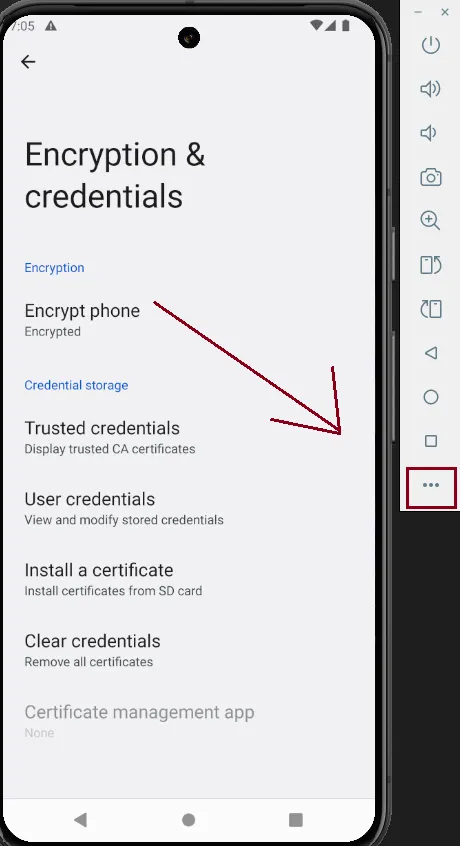
- Settings > Proxy
- set Proxy to Manual Proxy
- host: 127.0.0.1 && Port: 8080
- Apply & Done!
Setting Up Frida
[!NOTE] Prerequisites: - python - Rooted Android device (for advanced functionality; non-rooted devices have limited capabilities). - USB debugging enabled on your Android device. - Android Debug Bridge (ADB) installed on your computer.
**Installation
- pip install frida-tools
- frida --version
[!IMPORTANT] Download the appropriate frida-server binary from here According to your Device CPU Architecture
check in AVD Manger for CPU arch Or Run
adb shell getprop ro.product.cpu.abi
- Rename the "frida-server-16.5.7-android-x86_64" to "frida-server" for easier navigation
-
**Push the Frida Server to the Device:
adb push frida-server /data/local/tmp/ -
Set Permissions:
- make frida-server executable
adb shell "chmod 755 /data/local/tmp/frida-server"
- make frida-server executable
-
**Start the Frida server:
adb shell "/data/local/tmp/frida-server &"
'&' ampersand is used to run frida in background, remove '&' to run it foreground
[!tip] - Use
frida-ls-devicesto verify that the device is listed, If the device appears in the list, the setup is complete.